Ad Commander and Ad Commander Pro 1.3.0 added the ability for AI Agents to easily interact with your ad statistics and ads. The abilities currently exposed to AI Agents are:
- Get list of ads or a single ad: Ad ID, title, and published status always returned. More detailed information optionally available.
- Get ad statistics: Report data is filterable in the same way as the traditional Ad Commander Reports screen. Agents can specify the period to return or filter by ad IDs.
- Change ad status: Agents can switch ads between publish and draft post status.
- More abilities coming soon.
Requirements
There are a few requirements that must be met for AI Agents to interact with Ad Commander:
- WordPress 6.9 or higher
- Ad Commander 1.3.2 or higher
- Ad Commander Pro 1.3.2 or higher (required for some abilities)
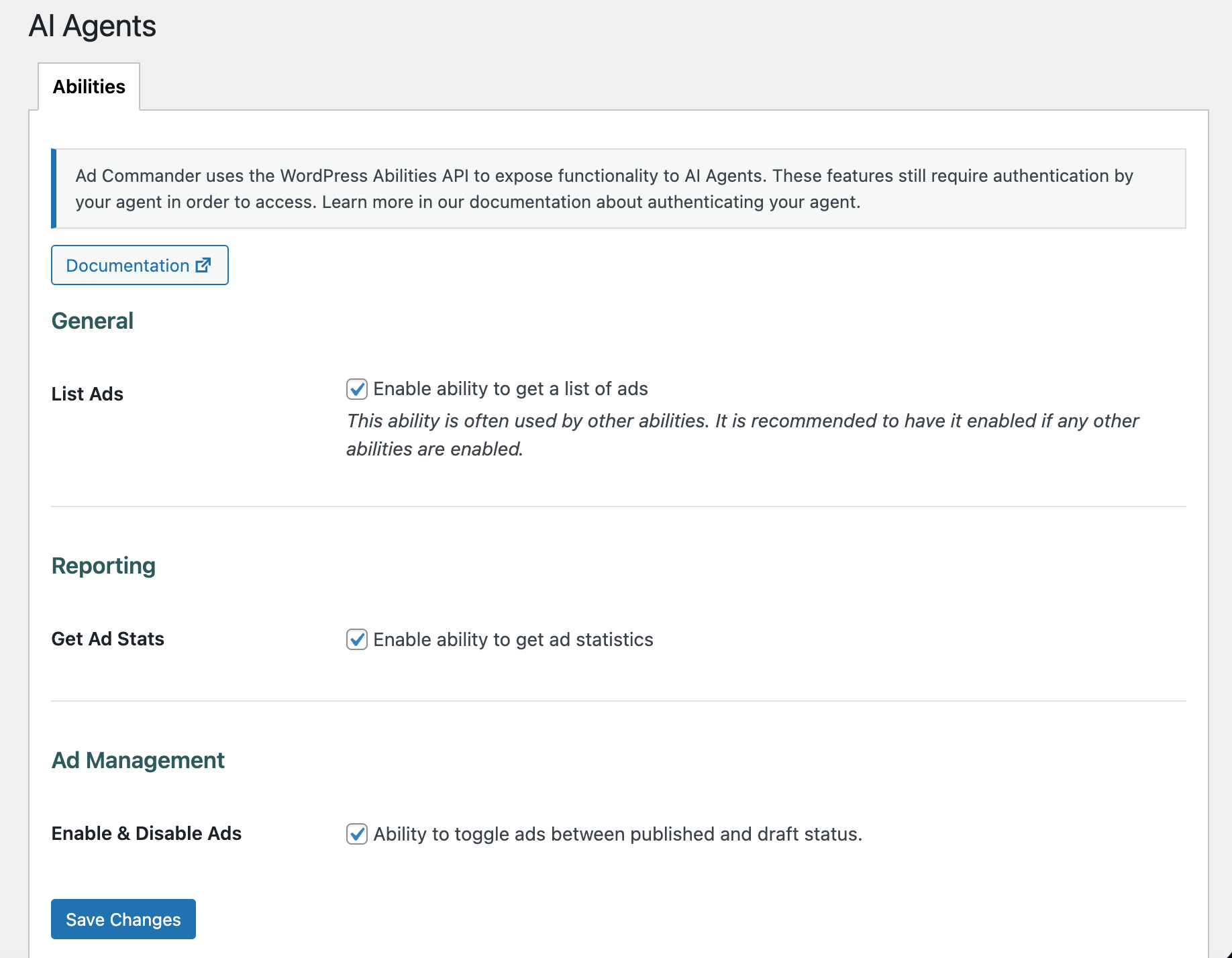
- Abilities enabled in Ad Commander -> AI Agents
- Local tracking enabled (if using the get-ad-stats ability)
- Authenticated access to your website by your agent
Getting started
Before beginning to work with your agent, make sure you’ve enabled the necessary abilities in Ad Commander -> AI Agents.
Granting access
As mentioned above, an agent must have authenticated access to your site in order to access these features. All abilities require the same user capabilities that a regular WordPress user must have to access your Ad Commander data. Typically, this is the manage_options capability (Administrator). You can also enable Editor access to Ad Commander in settings to lower this requirement.
The way in which you give an agent access to your site is outside the scope of Ad Commander itself, but one option is to create an Application Password for your user or a separate user. You can then provide the username and application password to your agent. Also, consider implementing the WordPress MCP Adapter on your site. When using the MCP adapter, credentials can be provided in a config file, and abilities are automatically discovered by agents.
Pointing your agent in the right direction
Once you’ve created a way for your agent to authenticate to your website, the next step is pointing it toward your site. Here’s an example of how to do this:
Connect to my WordPress site at [https://XXXX] and retrieve a list of available abilities.
Note that if you are not using the MCP Adapter, you may need to provide your credentials at this time. Your agent may also require more specific instructions, such as the path to the WordPress Abilities endpoint on your server (/wp-json/wp-abilities/v1/abilities). In this situation, your agent will use Curl or a similar means to authenticate and retrieve a list of Abilities from the WordPress REST API. If using the MCP Adapter, the discovery process is automatic.
If successful, your agent should provide a list of Abilities that includes those available from Ad Commander, WordPress core, and other plugins.
Usage examples
The tools provided by Ad Commander allow you to create agent automations that suit your particular goals. A couple of use cases could be:
Check my ad stats for the last 30 days. If any ads average below a 1% CTR and have over 1000 impressions, set them to draft.
In this scenario, the agent could pull ad stats, evaluate the data, and then switch an ad to draft. You could also modify this example to pull data from your analytics platform if your agent has access.
Pull my ad stats from wpadcommander.com every Monday morning at 9 am and send them to me on Slack.
This would automate your ad stats retrieval to avoid having to login to WordPress and pull reports manually.
Limiting risk and unexpected behaviors
Ad Commander makes these tools available to your agents, but how they are used is ultimately up to you and your agents. To limit risks, we have chosen not to create tools that allow agents to permanently delete or trash ads. They are limited to switching the post status between draft and publish.
Having said that, it is possible an agent could find a way around this limitation. For example, another plugin or WordPress itself could expose the ability to delete posts of any type. Another possibility is that an agent could decide to open a web browser, find your ad, and click delete. This behavior would circumvent the Abilities API.
To help avoid these scenarios we recommend that you monitor the abilities available to your agent. We also recommend being explicit in what you want your agent to do or not do.
A note on page caching
If an agent is enabling or disabling ads, and your site uses page caching, we recommend using client-side rendering. This will avoid your ads continuing to display after being moved to draft.